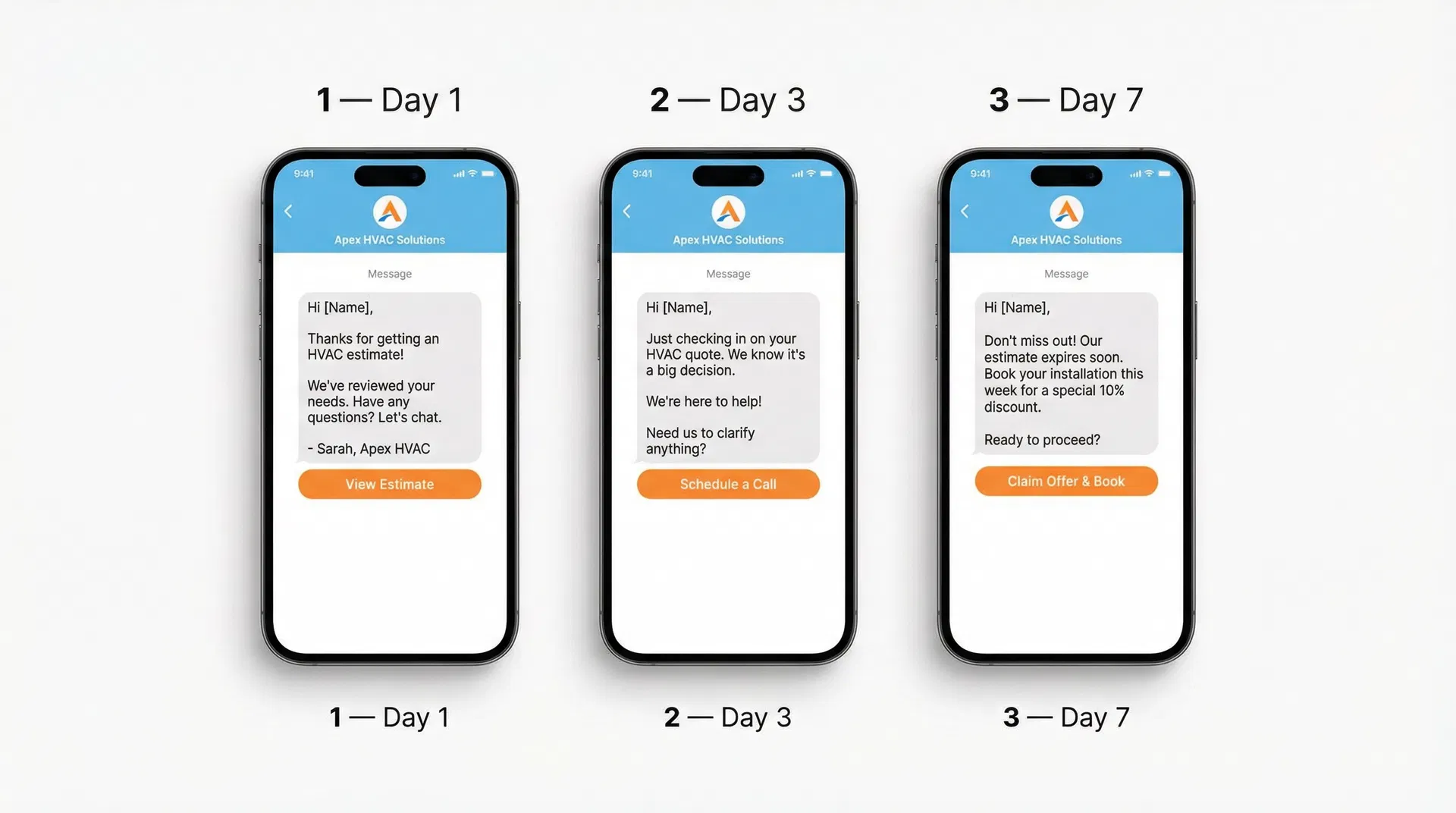
Day 1. Day 3. Day 7. Three messages. Three different angles. This is the exact follow-up sequence that converts three times more HVAC estimates into booked jobs — without being pushy, without being annoying, and without requiring any manual effort once it's automated.
Why Three Touches Is the Magic Number
Sales research consistently shows that the majority of conversions happen between the second and fifth contact. Yet most HVAC companies either send one follow-up and give up, or send no follow-up at all. The three-touch sequence hits the sweet spot: enough persistence to capture the undecided customer, not so much that it feels aggressive. The three messages serve three distinct psychological functions. The first message reinforces value and keeps your company top of mind. The second message addresses the most common objection — usually price or timing — and provides social proof. The third message creates gentle urgency and makes booking as easy as possible. Together, they guide the customer from 'considering' to 'committed' in a way that feels helpful rather than salesy. In Phoenix, AZ and Atlanta, GA, HVAC companies using this sequence report estimate conversion rates 2 to 3 times higher than their previous average.
Day 1 Message: The Value Reminder
The Day 1 message goes out the same day the estimate is sent, or the following morning if the estimate was delivered late in the day. Its purpose is to reinforce the value of your proposal and make it easy for the customer to ask questions or move forward. Exact script (SMS): 'Hi [Name], it was great meeting you today! Your estimate is attached — we'd love to help you get your [system type] sorted. Any questions, just reply here. We can usually get you on the schedule within the week. — [Your Name], [Company]' Exact script (Email subject): 'Your HVAC Estimate + A Quick Note From [Your Name]' — Open with a warm personal note, recap the two or three most important value points (warranty, brand, your experience), and include a clear call to action: 'Ready to move forward? Click here to book your installation date.'
Day 3 Message: The Objection Handler
By Day 3, customers who haven't responded are usually stuck on one of three objections: the price feels high, they're comparing you to another quote, or they're not sure about the timing. The Day 3 message addresses all three proactively. Exact script (SMS): 'Hi [Name], just following up on your estimate. We know it's a big decision — if you have any questions about the price, the equipment, or the timeline, I'm happy to chat. We also offer flexible financing if that helps. — [Your Name]' Exact script (Email): Lead with a brief testimonial or case study from a similar customer in Dallas, TX or Denver, CO. Something like: 'Last month we installed the same system for a family in [neighbourhood] — here's what they said.' Then address the financing option and reiterate your warranty. Close with a direct booking link.
Day 7 Message: The Urgency Close
The Day 7 message is the closer. Its job is to create genuine urgency — not manufactured scarcity, but real scheduling pressure — and make booking as frictionless as possible. By this point, the customer has had a week to decide. They're either close to yes or they need one final nudge. Exact script (SMS): 'Hi [Name], last note on your estimate — our schedule is filling up for [month] and I want to make sure you can get your preferred date. If you're ready to move forward, here's the booking link: [link]. If the timing isn't right, no worries — just let me know. — [Your Name]' This message works because it's honest, low-pressure, and provides a clear exit. Customers who aren't ready appreciate the grace. Customers who are ready appreciate the nudge. In Toronto, ON and Houston, TX, this message alone recovers 15 to 20 percent of estimates that had gone silent.
Channel Strategy: When to Text vs Email vs Call
- 1Day 1 SMS: Highest open rate (98%), fastest response. Use for the initial warm follow-up.
- 2Day 1 Email: Supports the SMS with more detail — estimate recap, value points, booking link.
- 3Day 3 SMS: Brief objection-handling message. Keep it under 160 characters.
- 4Day 3 Email: Longer format — testimonial, financing details, FAQ answers.
- 5Day 7 SMS: The urgency close. Direct, brief, with a booking link.
- 6Day 7 Phone call: For high-value estimates ($3,000+), a personal call on Day 7 significantly increases conversion.
- 7After Day 7: Move to a monthly nurture email sequence. Don't abandon the lead — just reduce frequency.
How to Automate the Full Sequence in Your CRM
The three-touch sequence should run automatically every time an estimate is sent — without anyone on your team having to remember to do it. In GoHighLevel, create a workflow triggered by the 'Estimate Sent' event (or a manual tag if your system doesn't have this trigger). Add the Day 1 SMS and email as immediate actions, the Day 3 messages with a 3-day delay, and the Day 7 messages with a 7-day delay. Add a stop condition: if the customer replies to any message or books an appointment, the sequence should stop immediately. Nothing kills a warm lead faster than receiving a follow-up message after they've already said yes. Test the workflow thoroughly before activating it, and monitor the first 20 estimates that go through it to ensure everything is firing correctly.
What to Do After Day 7 — Long-Term Nurture
Not every estimate converts in the first seven days. Some customers are genuinely not ready — they're waiting for a bonus, saving up, or planning a renovation. These leads are not lost; they're delayed. Move them to a long-term nurture sequence that sends one helpful, non-salesy message per month. Monthly nurture content ideas: a seasonal maintenance tip, a blog article about energy savings, a customer success story, or a limited-time offer. The goal is to stay top of mind so that when they are ready to move forward — in 30 days or 6 months — your company is the first one they think of. In Seattle, WA and Denver, CO, HVAC companies running long-term nurture sequences report that 20 to 30 percent of their monthly bookings come from leads that were initially unconverted.
Want This System Built for Your Business?
We install done-for-you revenue systems for HVAC companies. Book a free 30-minute Revenue Audit and we'll show you exactly what's leaking and how to fix it.
Book My Free Revenue AuditFrequently Asked Questions
How many follow-up messages should I send after an HVAC estimate?
Three messages over seven days is the proven sweet spot — Day 1, Day 3, and Day 7. After Day 7, move unconverted leads to a monthly nurture sequence rather than continuing to follow up aggressively. More than three follow-ups in the first week risks feeling pushy and can damage the customer relationship.
What should I say in a Day 1 HVAC estimate follow-up text?
Keep it warm and helpful: 'Hi [Name], it was great meeting you today! Your estimate is attached — any questions, just reply here. We can usually get you on the schedule within the week. — [Your Name], [Company].' The goal is to reinforce value and make it easy to ask questions, not to pressure them into a decision.
How do I follow up on an HVAC estimate without being annoying?
The key is to make each message serve a different purpose. Day 1 reinforces value. Day 3 addresses objections. Day 7 creates gentle urgency. Each message should feel helpful rather than repetitive. Also, always include an easy way to opt out or say 'not right now' — this reduces friction and actually increases trust.
What is the best channel for HVAC estimate follow-up — text or email?
Use both. SMS has a 98% open rate and is best for brief, action-oriented messages. Email allows for more detail — testimonials, financing information, equipment specs. The most effective follow-up sequences use SMS for the primary message and email as a supporting channel with additional context and a booking link.
How do I automate my HVAC estimate follow-up sequence?
Use a CRM like GoHighLevel to create a workflow triggered when an estimate is sent. Add the Day 1, Day 3, and Day 7 messages with the appropriate delays, and set a stop condition for when the customer replies or books. The entire sequence runs automatically without any manual effort, ensuring consistent follow-up on every estimate regardless of how busy your team is.